Skip to content
saanjha
Requirements

“I need 10 kg basmati rice.”

Community buying starts with someone going to the market. This starts from the other end — you say what you need, and the sellers around you come to you.

How it works

One post, several real answers.

The whole point is to move the effort off the household and onto the sellers who actually want the order.

You describe it once

Quantity, quality, when you need it by. One post reaches every seller nearby who can actually supply it, instead of five phone calls that each start from nothing.

Sellers respond, or claim it

Depending on the category, a seller either claims a requirement at a listed price or responds with their own — so a simple order does not turn into an auction nobody wanted.

You compare more than price

Availability, timing, delivery and any offer sit next to the number. The cheapest response is not automatically the one that arrives.

Commitment is enforced

Winning a requirement and then not fulfilling it carries penalties, suspension of seller privileges and an effect on rating. A response you cannot rely on is worse than none.

Requirements expire

A post has a life. It closes when you have what you need or when the window passes, so sellers are never quoting into a request that went stale a week ago.

Neighbours can join in

When several households need the same thing, the requirement can become a community purchase — which is usually a better price for all of them.
Step by step

From a sentence to a delivery.

  1. 1

    Post the requirement — what, how much, and by when.

  2. 2

    Nearby sellers who can supply it are notified.

  3. 3

    Responses arrive with price, availability, timing and delivery.

  4. 4

    You pick one, and pay the seller directly at handover.

Compare before you buy

See what everyone nearby is charging.

Sellers build catalogues through search, an existing catalogue, or assisted onboarding — so the same product can carry different pricing and availability across different sellers and communities, and you can see that rather than guess at it.

Local Saanjha seller

₹X

Quick commerce

₹Y

Community offer

₹Z

Illustrative only. Prices and availability vary by location, seller and time — this is a picture of the mechanism, not a quoted saving.

Keeping it honest

The failure mode this has to avoid.

A request-for-quote marketplace fails in a predictable way: sellers either stop responding, or spray low quotes to win volume and then under-deliver. Both are worse than not having the feature.

  • Responding has to be worth a seller’s time. Requirements are routed to sellers who can genuinely supply them, rather than broadcast to everyone so that most responses are wasted effort.
  • A quote is a commitment, not an opening bid. Fulfilment against accepted responses is tracked, and a seller who repeatedly wins and does not deliver loses the privilege.
  • Reports are not verdicts. “Intentionally false quote” is easy to allege and hard to prove — a buyer who found something cheaper may simply want out. Evidence is weighed on both sides, and per-buyer report rates are tracked as closely as seller behaviour.

For sellers

Demand that arrives already qualified.

Somebody in your area has said exactly what they want and when. That is a better lead than an ad impression, and it costs you nothing to answer.

You quote your own price

No rate card, no platform-set price, and no obligation to match anyone. You decide whether the order is worth having.

The customer becomes yours

A household you supply is recorded as your customer, not resold back to you as a lead the next time they need the same thing.

In the app

When nobody nearby stocks it, you ask.

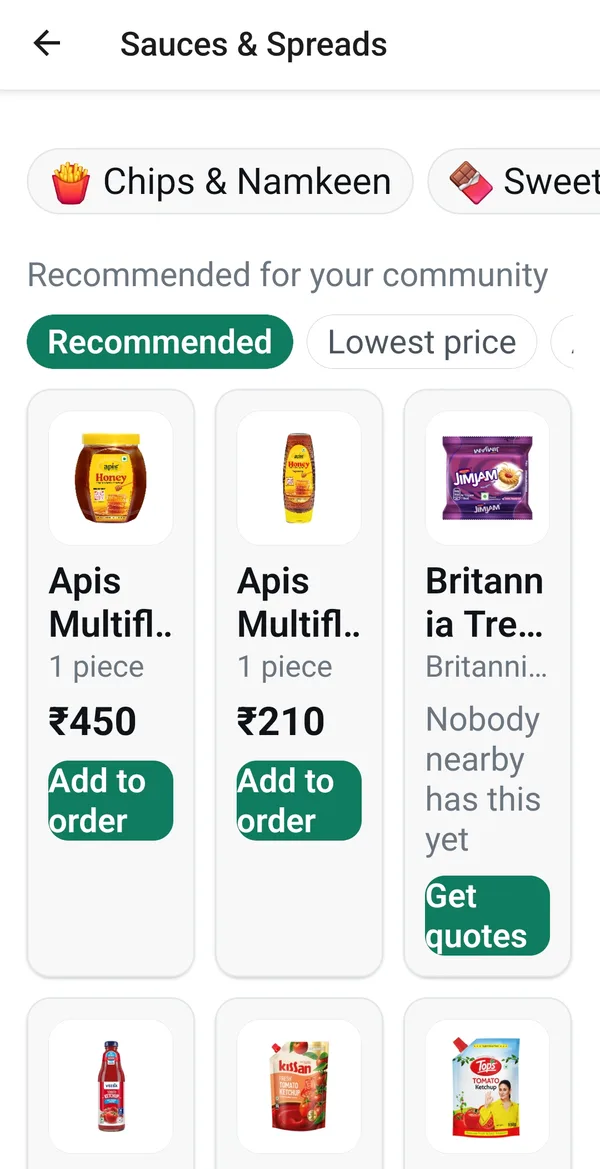
  • A product listing showing items recommended for your community with prices, and one item marked "Nobody nearby has this yet" with a Get quotes button.

    Products your community can actually buy, with prices. Where nobody nearby stocks something, the button becomes “Get quotes” rather than a dead end.

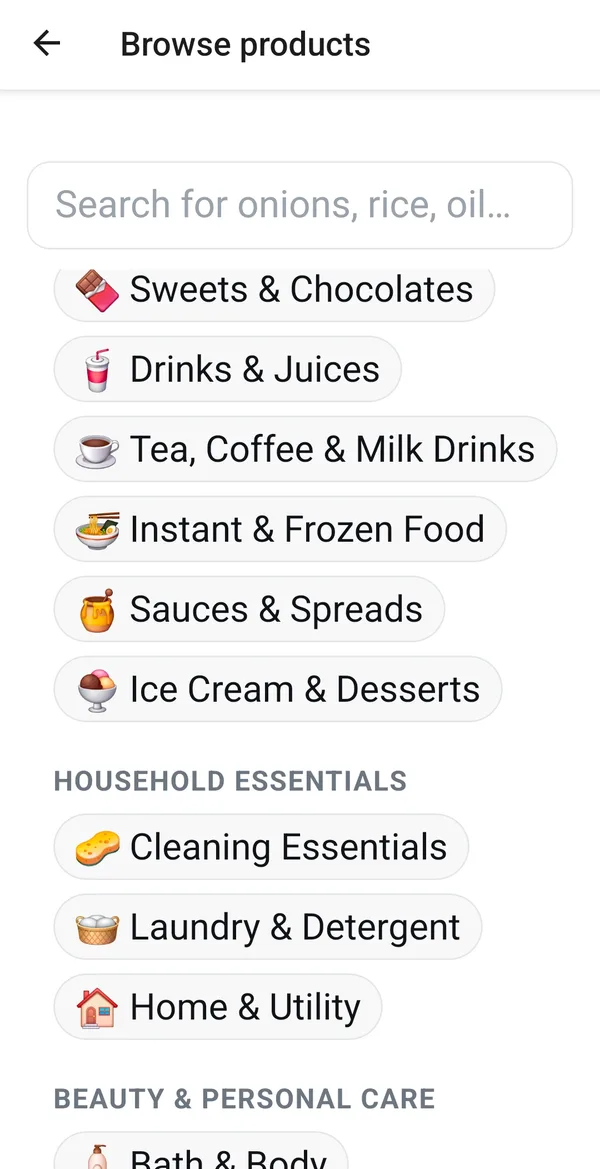
  • The Browse products screen, listing categories such as sweets and chocolates, drinks and juices, cleaning essentials and laundry.

    Or start from the aisle. Categories are the same ones a neighbourhood shop actually stocks.

Real screens from the Saanjha Android app. Some content varies by community, and what you see depends on which sellers and services are active where you live.

Say what you need.

Available now on Android and iPhone. You’ll need an invite from a neighbour to join a community.